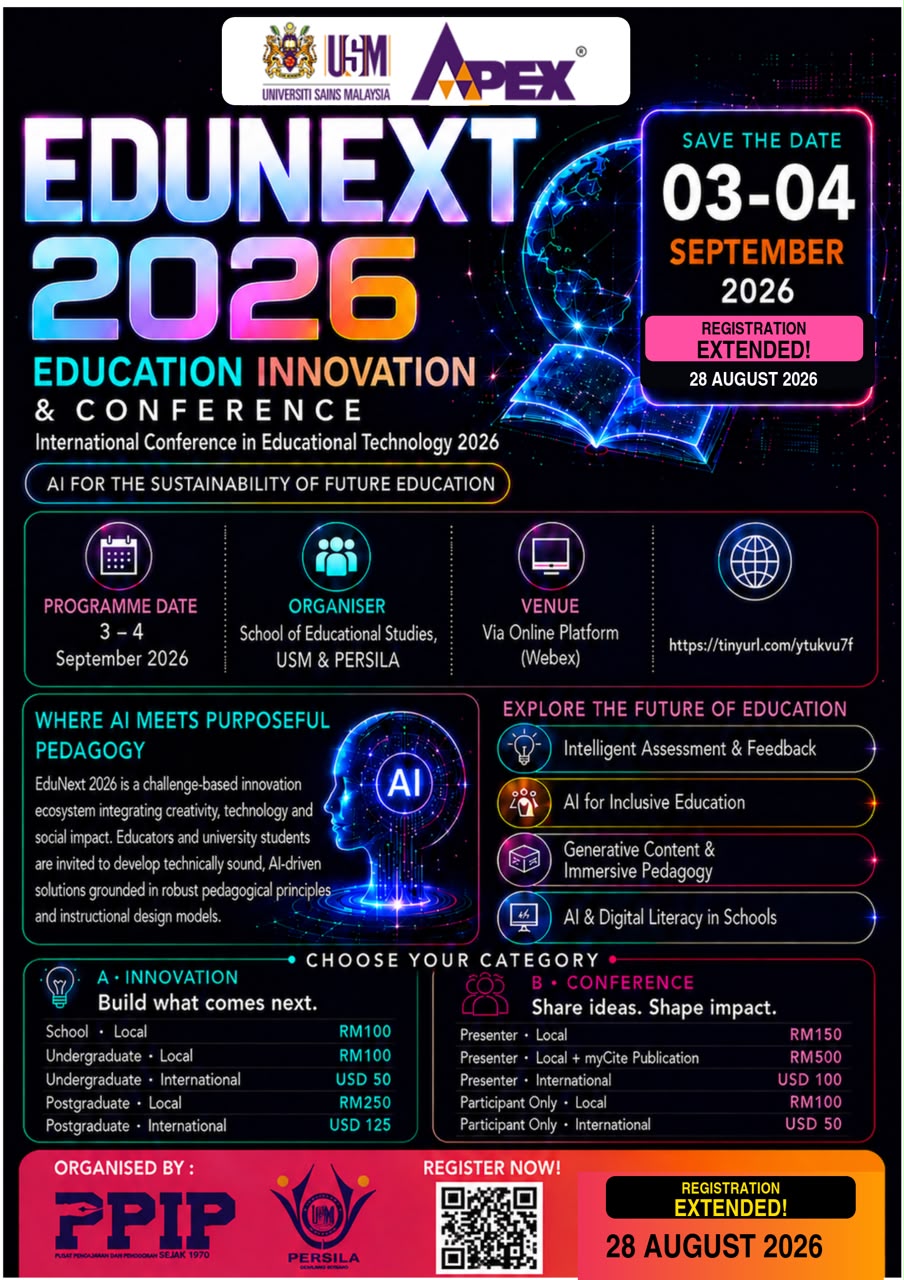
EDUNEXT: INTERNATIONAL EDUCATION INNOVATION & CONFERENCE 2026
AI for the Sustainability of Future Education
๐
3โ4 September 2026
๐ Online Conference (Via Online Platform)
Welcome to EduNext 2026
EduNext: International Education Innovation 2026 is an international challenge-based platform that brings together educators, undergraduate students and postgraduate students to develop artificial intelligence solutions for real-world educational needs. The event combines an AI education innovation competition, expert knowledge-sharing sessions and live pitching in a fully online environment.
Participating teams are encouraged to create original and functional innovations that demonstrate clear educational value, responsible AI use and sound instructional design. Through EduNext, participants can strengthen their practical AI competencies, showcase their work to an international audience and build meaningful connections across universities, schools and educational organisations.
Main
PROGRAMME OVERVIEW
Objectives
- Develop innovative AI solutions for education
- Promote instructional design models
- Strengthen university-school collaboration
- Enhance AI competencies among educators and students
COMPETITION THEMES
- Intelligent Assessment and Feedback
- AI for Inclusive Education
- Generative Content and Immersive Pedagogy
- AI and Digital Literacy in Schools
EVENT HIGHLIGHTS
| Event | Highlights |
|---|---|
| AI Education Innovation Competition | Present an original AI-supported solution that addresses an authentic educational challenge. |
| Expert Keynote Sessions | Gain current insights from recognised experts in artificial intelligence, educational technology and innovation. |
| International Knowledge Exchange | Connect with educators, students and institutions from Malaysia and the wider ASEAN region. |
| Digital Recognition | Eligible participants and award recipients will receive digital certificates. |
| Innovation e-Book | Selected innovations are intended to be featured in an e-book on innovation integration in teaching and learning. |
| Publication | Special issues in MyCITE publication |
COMPETITION CATEGORIES
EduNext 2026 welcomes local and international participation in two categories:ย
- Innovation Category - Undergraduate and postgraduate
- Conference category - Postgraduate
IMPORTANT DATES
| Milestone | Date |
|---|---|
| Registration Opens | 1/8/2026 |
| Innovation Submission deadline | 25/8/2026 |
| Conference Registration Dateline | 25/8/2026 |
| Innovation Judging | 27/8-1/9/2026 |
| EduNext 2026 | 3–4 September 2026 |
| Digital Certificate Distribution | October 2026 |
SPEAKERS PREVIEW
Learn from experts who are shaping the future of artificial intelligence and education.
Keynote and invited speakers will be announced soon.

Keynote Speakers
Innovation
Competition Theme
AI for the Sustainability of Future Education
Participants are invited to develop responsible and sustainable AI innovations that respond to present and emerging challenges in education.
Competition Sub-themes
| Sub-theme | Scope |
|---|---|
| Intelligent Assessment & Feedback | Innovations in assessment automation, immediate feedback and performance analytics that support more informed instructional decisions. |
| AI for Inclusive Education | Intelligent assistive technologies and inclusive solutions that improve educational access for learners with disabilities or reduce learning gaps. |
| Generative Content & Immersive Pedagogy | The use of generative AI to create multimedia learning materials, interactive simulations, virtual or augmented reality experiences, and realistic learning scenarios. |
| AI & Digital Literacy in Schools | Responsible AI literacy and digital literacy within schools and/or higher education institutions. |
Participation Categories
- Undergraduate / School โ Local
- Undergraduate โ International
- Postgraduate โ Local
- Postgraduate โ International
Team Composition
Each innovation team should comprise five to six members.ย
Eligibility and General Conditions
- The innovation must be original and supported by scientific or scholarly reasoning.
- The submission must demonstrate clear integration or use of AI, such as machine learning, computer vision, natural language processing or generative AI.
- The innovation must use an actual AI model or functional AI-enabled component.
- The project must demonstrate relevance to education, teaching or learning.
- The submission must be free from plagiarism and must not reproduce another partyโs product or intellectual property without permission.
- The content must avoid sensitive issues related to race, royalty and religion (3R).
- Participants are responsible for the accuracy, ethical use, privacy and security of their innovation.
Required Submission Materials
| Item | Requirement |
|---|---|
| Guidelines | View Guidelines Document โ |
| Project abstract or summary | Submitted for registration and preliminary project information. |
| Innovation infographic | Include introduction, problem statement, methodology, analysis, significance and impact, and the supported SDG. |
| User manual | Provide step-by-step instructions and show how the innovation may be integrated into teaching and learning. |
| Pitching and demonstration video | Maximum duration: five minutes. Include an explanation of the project and a demonstration of its functionality. |
| Supporting materials | Provide relevant diagrams, links, declarations or evidence where required. |
Evaluation Process
Asyncrhonous evaluation by expert in educational technology from date 27/08/26 to 01/09/26
Assessment Criteria
| Criterion | Maximum score | What judges will consider |
|---|---|---|
| Innovation | 3 | Originality and novelty of the idea |
| Artificial Intelligence | 3 | Depth, relevance and clarity of AI integration |
| Application Design | 3 | Clarity and completeness of the system or technical design |
| Impact | 3 | Potential educational or real-world impact |
| Creativity | 3 | Quality, engagement and creativity of the presentation |
| AI Ethics | 3 | Specific and appropriate ethical considerations |
| Cybersecurity | 3 | Security awareness and clear mitigation measures |
| TOTAL | 21 |
Scoring scale: 1 = Low | 2 = Moderate | 3 = High
Awards and Recognition
- Intelligent Assessment & Feedback Award
- AI for Inclusive Education Award
- Generative Content & Immersive Pedagogy Award
- AI & Digital Literacy Award
- Best Innovation Special Award
- Digital certificates for winners, runners-up, third-place recipients and eligible participants
INNOVATION GUIDELINES
Video & Infographic Submission
Participants are required to submit their presentation video and infographic through the Google Form provided.
๐ฅ Presentation Video
๐ Infographic
Please ensure that the files are submitted according to the given requirements and deadline.
Innovation Submission Guidelines:
CONFERENCE
CONFERENCE AND PRESENTATION SESSIONS
- Conducted online from 3 to 4 September 2026.
- Features 2 Keynote Speakers (one at the Opening Ceremony and one at the Closing Ceremony).
- Parallel sessions utilize separate Webex links for each breakout room to avoid data traffic shortage.
- Each breakout room session begins with insights from invited speakers.
- The Closing Ceremony features the announcement of Innovation category winners and special conference awards.
CONFERENCE CATEGORY
- Presenter Local Institutions: RM150.00
- Presenter Local Institutions + myCite Publication: RM500.00
- Presenter International Institutions: USD 100.00
- Participants Only (Local): RM100.00
- Participants Only (International): USD 50.00
ABSTRACT GUIDELINES
Guidelines
- GUIDELINES
- Presentation Format
- Presentation Duration
- Presentation Slides
- Technical Requirements
- Screen Sharing
- Presenter Identification
- During the Presentation
- Question-and-Answer Session
- Pre-Recorded Presentation as Backup
- File Naming
- Attendance and Certificate
- Change of Presenter
- Technical Difficulties
- Recording and Photography
- Academic and Professional Conduct
- Important Reminder
GUIDELINES
These guidelines are intended for participants presenting their research papers virtually during the conference. Presenters are requested to observe the following requirements to ensure the smooth conduct of all online presentation sessions.
Presentation Format
- All online paper presentations will be conducted live via the designated online conferencing platform provided by the conference organiser.
- The online meeting link will be shared with registered presenters before the conference.
- Presenters are required to join the assigned virtual room at least 15 minutes before the scheduled session for attendance and technical checking.
- Presenters should remain in the virtual room throughout their assigned parallel session where possible.
Presentation Duration
Each presenter will normally be allocated:
- 10โ12 minutes for oral presentation
- 3โ5 minutes for questions and discussion
Presenters must strictly observe the allocated presentation time. The Session Chair may stop presentations that exceed the scheduled duration to ensure that all presenters receive equal presentation time.
Presentation Slides
Presenters are encouraged to prepare their presentation using Microsoft PowerPoint, Google Slides, Canva Presentation, PDF slides, or equivalent presentation software.
A recommended presentation structure is:
- Title of the study
- Author(s) and affiliation(s)
- Background / Introduction
- Problem Statement
- Research Objectives / Research Questions
- Methodology
- Findings / Results
- Discussion
- Conclusion
- Implications / Recommendations
- Acknowledgement, where applicable
Presenters are encouraged to keep slides concise and visually clear.
Recommended Slide Format
- Approximately 8โ12 slides
- Minimum font size: 20โ24 pt
- Use readable fonts and appropriate contrast
- Avoid excessive text on individual slides
- Use figures, diagrams, charts, or tables where appropriate
- Clearly acknowledge sources for copyrighted materials, figures, or data used in the presentation
Technical Requirements
Presenters are responsible for ensuring that they have:
- A stable internet connection
- A functioning computer or laptop
- A working microphone
- A webcam, where available
- Updated presentation and online conferencing software
- A quiet and appropriate environment for presentation
The use of headphones or earphones with a microphone is recommended to minimise background noise and audio feedback.
Presenters are encouraged to test their:
- Internet connection
- Microphone
- Camera
- Screen-sharing function
- Presentation slides
before joining the conference session.
Screen Sharing
Presenters will normally be responsible for sharing their own presentation slides.
Before presenting:
- Open the presentation file in advance.
- Close unnecessary applications and browser windows.
- Disable personal notifications.
- Ensure confidential or private information is not visible on the screen.
- Select the correct presentation window when using the screen-sharing function.
The Session Chair or Technical Committee will provide assistance where necessary.
Presenter Identification
Upon entering the virtual conference room, presenters should rename their display name using the following format:
Presenter Name โ Institution
Example:
Hanna Mohd Hussaini โ Universiti Sains Malaysia
This will assist the Session Chair and Technical Committee in identifying presenters.
During the Presentation
Presenters should:
- Keep their microphone muted when another participant is presenting.
- Activate the microphone only when invited to present or participate in the discussion.
- Turn on the camera during their presentation where internet connectivity permits.
- Speak clearly and at an appropriate pace.
- Follow instructions from the Session Chair.
- Complete the presentation within the allocated time.
- Maintain professional and respectful communication throughout the session.
Question-and-Answer Session
After the presentation, the Session Chair will facilitate a short question-and-answer session.
Questions may be raised through:
- Verbal discussion
- The online meeting chat function
- Other mechanisms determined by the Session Chair
Presenters should answer questions concisely to allow sufficient time for discussion and for subsequent presenters.
Pre-Recorded Presentation as Backup
Presenters may be requested to prepare a pre-recorded presentation as a technical backup, particularly for international presenters or participants who may experience internet connectivity problems.
Recommended requirements:
- Duration: 10โ12 minutes
- Format: MP4
- Recommended resolution: 720p or 1080p
- Clear audio narration
- Slides should be clearly visible
- Presenter may include webcam video if preferred
The recording should follow the same structure and time allocation as the live presentation.
If a backup video is required, the Secretariat will provide the submission procedure and deadline separately.
File Naming
Presentation materials and pre-recorded videos, where applicable, should be named using the following format:
PaperID_PresenterName
Example:
EDUNEXT26_HannaMohdHussaini.pptx
or
EDUNEXT26_HannaMohdHussaini.mp4
Presenters should avoid using special characters in file names.
Attendance and Certificate
Presenters must:
- Complete the conference registration and payment requirements.
- Attend their assigned presentation session.
- Deliver their presentation according to the conference schedule.
A presentation certificate will normally be issued only to participants who successfully complete the presentation requirements.
Change of Presenter
If the registered presenter is unable to present, another listed co-author may present the paper with prior notification to the Conference Secretariat.
Requests for a change of presenter should be submitted before the conference date and are subject to approval by the organiser.
Technical Difficulties
In the event of internet disruption or other technical problems:
- The presenter should attempt to reconnect to the virtual room.
- The Session Chair may temporarily proceed to the next presentation.
- The affected presenter may be invited to present later in the same session, subject to available time.
- Where a backup presentation video has been submitted, the organiser may play the recorded presentation.
The organiser will make reasonable efforts to accommodate genuine technical difficulties; however, presenters are responsible for ensuring that their equipment and internet connection are functioning adequately.
Recording and Photography
Conference sessions may be recorded or photographed by the organiser for documentation, reporting, promotional, or academic purposes.
Participants should avoid independently recording or distributing another presenter's presentation without appropriate permission.
Academic and Professional Conduct
All presentations must comply with accepted standards of academic integrity.
Presenters are responsible for ensuring that:
- The work presented is their own or appropriately acknowledged.
- Sources are properly cited.
- Data and findings are represented accurately.
- Confidential or identifiable participant information is appropriately protected.
- Copyrighted materials are used appropriately.
Any form of plagiarism, research misconduct, or inappropriate behaviour may result in withdrawal of the presentation from the conference programme.
Important Reminder
Presenters are advised to regularly check their registered email address and the official conference communication channels for:
- Presentation schedules
- Virtual room links
- Technical briefing information
- Changes to presentation arrangements
- Submission deadlines
- Other important announcements
For further enquiries regarding online presentations, please contact the Conference Secretariat.I would particularly recommend keeping the 10โ12 minutes presentation + 3โ5 minutes Q&A format because it is manageable for parallel conference sessions.